Introduction
"A pixel office for your OpenClaw: turn invisible work states into a cozy little space with characters, daily notes, and guest agents."
This is Part 43 of the "Open Source Project of the Day" series. Today we explore Star-Office-UI (GitHub).
AI Agent work states are usually "invisible"—you don't know what they're doing, what they did yesterday, or whether they're online. Star-Office-UI is a pixel-style AI office dashboard system that visualizes AI assistant work states in real-time, letting you intuitively see "who's doing what, what happened yesterday, and who's online now." Through pixel-style office scenes, different work states map to different areas (rest area, work area, bug area), and characters automatically move based on state, with animations and speech bubbles making AI work "visible" and "fun." It supports multi-agent collaboration, Chinese/English/Japanese languages, AI-generated backgrounds, and desktop pet mode. It works best with deep integration with OpenClaw, but can also be deployed independently as a status dashboard.
Why is it worth exploring?
- 🎨 Pixel-Style Visualization: Transforms abstract AI work states into intuitive pixel office scenes
- 🤖 Multi-Agent Collaboration: Supports multiple AI agents online simultaneously, viewing team status in real-time
- 🌍 Multi-Language Support: One-click switching between Chinese/English/Japanese, with interface text, bubbles, and loading prompts all synchronized
- 🎨 AI-Generated Backgrounds: Integrates Gemini API to change office backgrounds with AI
- 🖥️ Desktop Pet Mode: Tauri-based desktop wrapper that turns the office into a transparent window desktop pet
- 🔗 Deep OpenClaw Integration: Seamless integration with OpenClaw, automatic Agent work state synchronization
What You'll Learn
- Star-Office-UI's core positioning: How to visualize AI work states
- State mapping mechanism: How 6 work states map to 3 office areas
- Multi-agent collaboration: How to invite other agents to join the office via join keys
- Deployment and integration: Quick deployment methods and integration with OpenClaw
- Technical architecture: Flask backend, Phaser frontend, Tauri desktop implementation
- Art asset management: Sources, licensing, and usage guidelines for pixel-style assets
Prerequisites
- Understanding of AI Agents basics (OpenClaw, multi-agent collaboration)
- Understanding of Web Development basics (Flask, frontend frameworks)
- Understanding of pixel-style games basics (optional)
- Understanding of state management basics (state switching, state synchronization)
Project Background
Project Overview
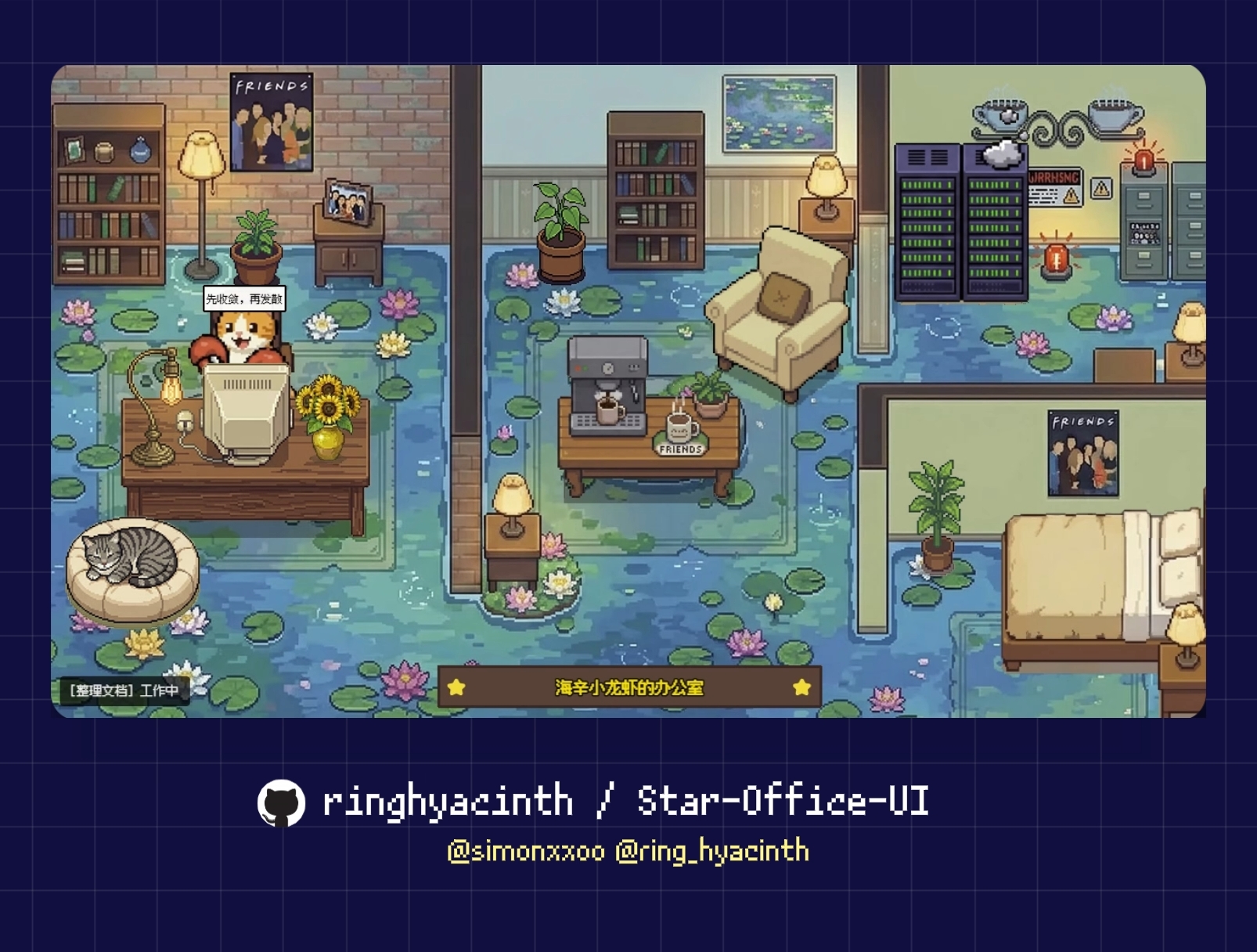
Star-Office-UI is a pixel-style AI office dashboard system designed to solve the problem of "invisible" AI Agent work states. Traditional AI Agent work processes are black boxes—users can't intuitively understand what the agent is currently doing, what it did yesterday, or whether it's online. Star-Office-UI transforms abstract work states into visual scenes through pixel-style office scenes:
- Rest Area (Sofa): Agent idle or task completion state
- Work Area (Desk): Agent working state (writing code, writing documents, searching, executing tasks, etc.)
- Bug Area: Agent error or exception state
Characters automatically move to corresponding areas based on current state, with animations and speech bubbles making AI work "visible" and "fun."
Core Value:
- State Visualization: Transforms abstract AI work states into intuitive visual scenes
- Multi-Agent Collaboration: Supports multiple AI agents online simultaneously, viewing team status in real-time
- Fun Factor: Pixel-style design makes AI work fun and lively
- Ease of Use: 30-second quick deployment, supports multiple integration methods
Author/Team Introduction
Star-Office-UI is co-created by Ring Hyacinth and Simon Lee, and is continuously maintained and built together with community developers (@Zhaohan-Wang, @Jah-yee, @liaoandi).
- Authors: Ring Hyacinth, Simon Lee
- Background: Innovators in AI Agent and visualization fields
- Project Creation Time: March 2026
Project Statistics
- ⭐ GitHub Stars: 2,851
- 🍴 Forks: 317
- 📦 Version: v1.0.0 (continuously updated)
- 📄 License: MIT (code), art assets for learning purposes only
- 🌐 Official Website: GitHub Repository
Project Characteristics:
- Open Source and Free: Code uses MIT license, free to use and modify
- Active Maintenance: Continuously updated with active community
- Innovative Design: Pixel-style visualization makes AI work fun
Main Features
Core Functionality
Star-Office-UI's core function is to visualize AI Agent work states. Through pixel-style office scenes, it lets users intuitively understand AI work states:
- State Visualization: 6 work states map to 3 office areas, characters automatically move
- Multi-Agent Collaboration: Supports multiple AI agents online simultaneously, viewing team status in real-time
- Yesterday's Memo: Automatically reads recent day's work records from
memory/*.md, displayed as "Yesterday's Memo" card - Real-Time Updates: State changes synchronize in real-time without page refresh
- Mobile-Friendly: Can be opened directly on mobile, suitable for quick glances when out
Use Cases
-
OpenClaw Users
- Deep integration with OpenClaw, automatic Agent work state synchronization
- View AI Agent work states and progress in real-time
-
Multi-Agent Team Collaboration
- Invite other agents to join the office via join keys
- View work states of all agents in the team in real-time
-
Personal Status Page
- Deploy independently as a personal status page or remote work dashboard
- Push states via API or scripts
-
Desktop Pet
- Use desktop pet mode to turn the office into a transparent window desktop pet
- View AI work states anytime without opening a browser
-
Demos and Presentations
- Used to demonstrate AI Agent work processes
- Showcase multi-agent collaboration scenarios
Quick Start
Method 1: Let the Lobster Deploy for You (Recommended for OpenClaw Users)
If you're using OpenClaw, just send this message to your lobster:
Please help me deploy Star Office UI according to this SKILL.md:
https://github.com/ringhyacinth/Star-Office-UI/blob/master/SKILL.md
The lobster will automatically complete clone, install dependencies, start backend, configure state synchronization, and send you the access address.
Method 2: 30-Second Manual Deployment
# 1) Clone repository
git clone https://github.com/ringhyacinth/Star-Office-UI.git
cd Star-Office-UI

# 2) Install dependencies
python3 -m pip install -r backend/requirements.txt

# 3) Prepare state file (first time)
cp state.sample.json state.json

# 4) Start backend
cd backend
python3 app.py
Open http://127.0.0.1:19000, then try switching states:
python3 set_state.py writing "Organizing documents"
python3 set_state.py error "Issue found, investigating"
python3 set_state.py idle "Standing by"
Core Features
-
State Visualization
- 6 States:
idle(standby),writing(writing code/docs),researching(searching/researching),executing(executing tasks),syncing(syncing data),error(error) - 3 Areas: Rest area (sofa), work area (desk), bug area
- Automatic Mapping: States automatically map to corresponding areas, characters automatically move
- Animation Effects: Character movement animations and speech bubbles
- 6 States:
-
Multi-Agent Collaboration
- Join Key Mechanism: Invite other agents to join the office via join keys
- Real-Time Sync: Multiple agent states synchronize in real-time without refresh
- Concurrency Control: Each key supports up to 3 simultaneous users by default
- Guest Push: Guests push states via
office-agent-push.pyscript
-
Multi-Language Support
- Chinese/English/Japanese: One-click switching between CN / EN / JP
- Full Synchronization: Interface text, bubbles, loading prompts all synchronized
- Internationalization: Supports use in multilingual environments
-
AI-Generated Backgrounds
- Gemini API Integration: Integrates Gemini API to change office backgrounds with AI
- Optional Feature: Core functionality works without API integration
- Custom Backgrounds: Generate personalized office backgrounds via AI
-
Desktop Pet Mode
- Tauri Wrapper: Tauri-based desktop wrapper version
- Transparent Window: Turns office into transparent window desktop pet
- Auto Start: Automatically starts Python backend on launch
- Cross-Platform: Mainly developed and tested on macOS, supports cross-platform
-
Security Hardening
- Sidebar Password Protection: Sidebar management functions require password protection
- Weak Password Blocking: Production environment weak password blocking
- Session Cookie Hardening: Session cookie security hardening
- Environment Variable Configuration: Configure sensitive information via
.envfile
-
Yesterday's Memo
- Auto Read: Automatically reads recent day's work records from
memory/*.md - Data Masking: Automatically masks sensitive information
- Card Display: Displays as "Yesterday's Memo" card
- Auto Read: Automatically reads recent day's work records from
-
Flexible Public Access
- Cloudflare Tunnel: Recommended Cloudflare Tunnel one-click public access
- Custom Domain: Supports custom domain and reverse proxy
- Mobile-Friendly: Can be opened directly on mobile
-
Art Asset Customization
- Sidebar Management: Sidebar manages characters / scenes / decoration assets
- Dynamic Frame Sync: Supports dynamic frame synchronization to avoid flickering
- Asset Replacement: Supports custom art assets
Project Advantages
| Comparison Item | Star-Office-UI | Traditional Status Page | Other Visualization Tools |
|---|---|---|---|
| Visualization | ✅ Pixel-style scenes | ⚠️ Text/charts | ⚠️ Charts/dashboards |
| Multi-Agent Support | ✅ Native support | ❌ Not supported | ⚠️ Partial support |
| OpenClaw Integration | ✅ Deep integration | ❌ No integration | ❌ No integration |
| Desktop Pet | ✅ Tauri desktop version | ❌ None | ❌ None |
| AI Generation | ✅ Gemini API | ❌ None | ❌ None |
| Multi-Language | ✅ CN/EN/JP | ⚠️ Single language | ⚠️ Partial support |
| Deployment Difficulty | ✅ 30-second quick deployment | ⚠️ Requires configuration | ⚠️ Requires configuration |
Why Choose Star-Office-UI?
- Innovative Visualization: Pixel-style design makes AI work states fun and intuitive
- Deep OpenClaw Integration: Seamless integration with OpenClaw, automatic Agent work state synchronization
- Multi-Agent Collaboration: Native support for multi-agent collaboration, viewing team status in real-time
- Quick Deployment: 30-second quick deployment, supports multiple integration methods
- Desktop Pet: Unique desktop pet mode, view AI work states anytime
- Open Source and Free: Code uses MIT license, free to use and modify
Detailed Project Analysis
Architecture Design
Star-Office-UI adopts a frontend-backend separation architecture:
- Backend (backend/): Flask-based backend service providing API interfaces and state management
- Frontend (frontend/): Phaser-based frontend pages implementing pixel-style office scenes
- Desktop Pet (desktop-pet/): Tauri-based desktop wrapper version (optional)
Core Components:
- State Management Module: Responsible for agent state storage, updates, and synchronization
- Multi-Agent Collaboration Module: Handles join keys, guest joining, state pushing, etc.
- Frontend Rendering Engine: Phaser-based pixel-style scene rendering
- AI Generation Module: Integrates Gemini API for AI-generated background decoration
- Desktop Pet Module: Tauri wrapper implementing transparent window desktop pet
State Mapping Mechanism
Star-Office-UI maps 6 work states to 3 office areas:
| State | Office Area | Trigger Scenario |
|---|---|---|
idle | 🛋 Rest Area (Sofa) | Standby / Task completion |
writing | 💻 Work Area (Desk) | Writing code / Writing docs |
researching | 💻 Work Area | Searching / Researching |
executing | 💻 Work Area | Executing commands / Running tasks |
syncing | 💻 Work Area | Syncing data / Pushing |
error | 🐛 Bug Area | Error / Exception handling |
Implementation Principle:
- State Update: Update state via
set_state.pyscript or API interface - State Storage: States stored in
state.jsonfile - Frontend Polling: Frontend periodically polls backend API to get latest state
- Character Movement: Characters automatically move to corresponding areas based on state changes
- Animation Effects: Play movement animations and display speech bubbles when characters move
Multi-Agent Collaboration Mechanism
Join Key Mechanism:
- Generate Join Key: Automatically generates
join-keys.jsonfile on first backend startup - Assign Key: Assign a join key to each team (e.g.,
ocj_example_team_01) - Guest Join: Guests join office via
office-agent-push.pyscript using join key - State Push: Guests push state every 15 seconds, updating office dashboard
- Concurrency Control: Each key supports up to 3 simultaneous users by default
Guest Access Flow:
# office-agent-push.py example
JOIN_KEY = "ocj_starteam02"          # Assigned key
AGENT_NAME = "Xiaoming's Lobster"    # Display name
OFFICE_URL = "https://office.hyacinth.im"  # Office address

python3 office-agent-push.py
OpenClaw Integration
Automatic State Synchronization:
Add the following rules to OpenClaw's SOUL.md (or Agent rules file):
## Star Office State Synchronization Rules
- When receiving a task: First execute `python3 set_state.py <state> "<description>"` before starting work
- After completing a task: Execute `python3 set_state.py idle "Standing by"` before replying
Integration Advantages:
- Automatic Sync: Agent work states automatically sync to office dashboard
- No Manual Work: No need to manually update states, agents automatically maintain
- Real-Time Updates: State changes synchronize in real-time without page refresh
Technology Stack
Based on project structure analysis, Star-Office-UI's technology stack includes:
- Backend: Flask (Python web framework)
- Frontend: Phaser (2D game framework), HTML/CSS/JavaScript
- Desktop Pet: Tauri (Rust + Web frontend)
- State Management: JSON file storage
- API Interface: RESTful API
Key Technologies:
- Phaser Game Engine: Used for rendering pixel-style office scenes
- Flask Backend Service: Provides API interfaces and state management
- Tauri Desktop Wrapper: Implements cross-platform desktop pet application
- WebSocket/Polling: Implements real-time state synchronization
Art Asset Management
Asset Sources:
Guest character animations use LimeZu's free assets:
License Agreement:
- Art Assets: Commercial use prohibited (learning / demo / exchange purposes only)
- Code / Logic: MIT (see LICENSE)
For commercial use, please replace all art assets with your own original materials.
Project Address and Resources
Official Resources
- 🌟 GitHub: https://github.com/ringhyacinth/Star-Office-UI
- 📚 SKILL.md: OpenClaw Skill Documentation
- 💬 Issues: https://github.com/ringhyacinth/Star-Office-UI/issues
- 🐛 Pull Requests: https://github.com/ringhyacinth/Star-Office-UI/pulls
Related Resources
- OpenClaw: https://github.com/openclaw/openclaw - Star-Office-UI's main integration target
- Guest Access Guide: frontend/join-office-skill.md
- Desktop Pet Guide: desktop-pet/README.md
- Changelog: docs/CHANGELOG_2026-03.md
Common APIs
| Endpoint | Description |
|---|---|
GET /health | Health check |
GET /status | Get main agent status |
POST /set_state | Set main agent status |
GET /agents | Get multi-agent list |
POST /join-agent | Guest joins office |
POST /agent-push | Guest pushes state |
POST /leave-agent | Guest leaves |
GET /yesterday-memo | Get yesterday's memo |
GET /config/gemini | Get Gemini API configuration |
POST /config/gemini | Set Gemini API configuration |
Target Audience
- OpenClaw Users: Users who want to visualize AI Agent work states
- Multi-Agent Teams: Teams needing collaboration and state visualization
- Individual Developers: Developers wanting personal status pages or remote work dashboards
- Desktop Pet Enthusiasts: Developers who like desktop pet applications
- Pixel Art Enthusiasts: Developers who like pixel-style design
Visit my personal homepage to find more useful knowledge and interesting products