Introduction
"A Claude Code plugin that shows what's happening."
This is Part 34 of the "Open Source Project of the Day" series. Today we explore Claude HUD (GitHub).
When writing code with Claude Code, you often can't easily see how much context has been used, which tools are currently running, whether sub-agents are active, or how far along the Todo list is — you have to dig through logs or wait for prompts. Claude HUD brings all of this right into your terminal, below the input field: one or more persistent status bars that show context health, tool activity, Agent status, and Todo progress in real time. Data comes from Claude Code's statusline API and transcript, with ~300ms refresh intervals — no extra windows or tmux needed, works in any terminal.
Why it's worth checking out:
- 📊 Real-time visibility: Context bar (green→yellow→red), usage bar, tools/Agents/Todos visible in one line
- 🖥️ Native integration: Uses Claude Code's statusline API — no token estimation, accurate data
- 📍 Persistent below input: Doesn't steal focus or open new windows — always in view
- ⚙️ Configurable: Preset Full/Essential/Minimal, or fine-tune individual items and layout
- 🔌 Standard plugin: Install via
/plugin marketplace, use immediately with/claude-hud:setup - 📈 Pro/Max/Team: Supports usage limit display (for subscribers)
What You'll Learn
- Claude HUD's positioning and typical display content (context, tools, Agents, Todos, Git, usage)
- Installation and configuration flow (marketplace, install, setup/configure)
- How it works: stdin JSON + transcript JSONL, ~300ms updates
- Configuration overview: lineLayout, pathLevels, gitStatus, display, etc.
- Presets and manual config.json editing
- Comparison with "no HUD" or custom monitoring approaches
- Usage and troubleshooting tips
Prerequisites
- Currently using or planning to use Claude Code (terminal version)
- Basic understanding of "context window" and "token" concepts is helpful
- Local requirements: Claude Code v1.0.80+, Node.js 18+ or Bun
Project Background
Project Introduction
Claude HUD is a real-time status bar plugin for Claude Code. It sits in your terminal, below the input field, persistently showing what's happening in the current session:
- Project path: Current directory (configurable 1–3 levels)
- Context health: Context window usage (progress bar + color) to avoid sudden context overflow
- Tool activity: Currently running or recently completed tools (Read, Edit, Grep, etc.) and their counts
- Agent status: Current sub-agent, model, task description, and elapsed time
- Todo progress: Task completion status (e.g., 2/5)
- Git: Branch, dirty state, ahead/behind, file statistics (optional)
- Usage: Pro/Max/Team users' rate-limit usage and 7-day breakdown (optional)
Data comes from Claude Code's native statusline API (including real token data) and transcript JSONL (parsing tools, Agents, and Todos), with an update frequency of approximately 300ms, no estimation needed.
Target users:
- Developers who code and debug with Claude Code daily
- Users who need to always know context and usage to avoid limits or slowdowns
- People who want to observe tool calls and sub-agent behavior for debugging or learning
- Users who want a "see session status at a glance" experience without switching windows
Author/Team Introduction
- Author: jarrodwatts (GitHub)
- Repository: Open-source plugin with complete README, CHANGELOG, CONTRIBUTING, tests, and release notes
Project Stats
- ⭐ GitHub Stars: ~3.7k+ (GitHub)
- 🍴 Forks: ~166
- 📦 Repository status: Actively maintained; contains
.claude-plugin/,commands/,src/,dist/,tests/ - 📄 License: MIT
- 📚 Documentation: README includes installation, configuration, options, troubleshooting; Claude Code Marketplace has an introduction
Tech stack: TypeScript, Node.js 18+ or Bun, integrated via Claude Code's plugin and statusline API.
Main Features
Core Purpose
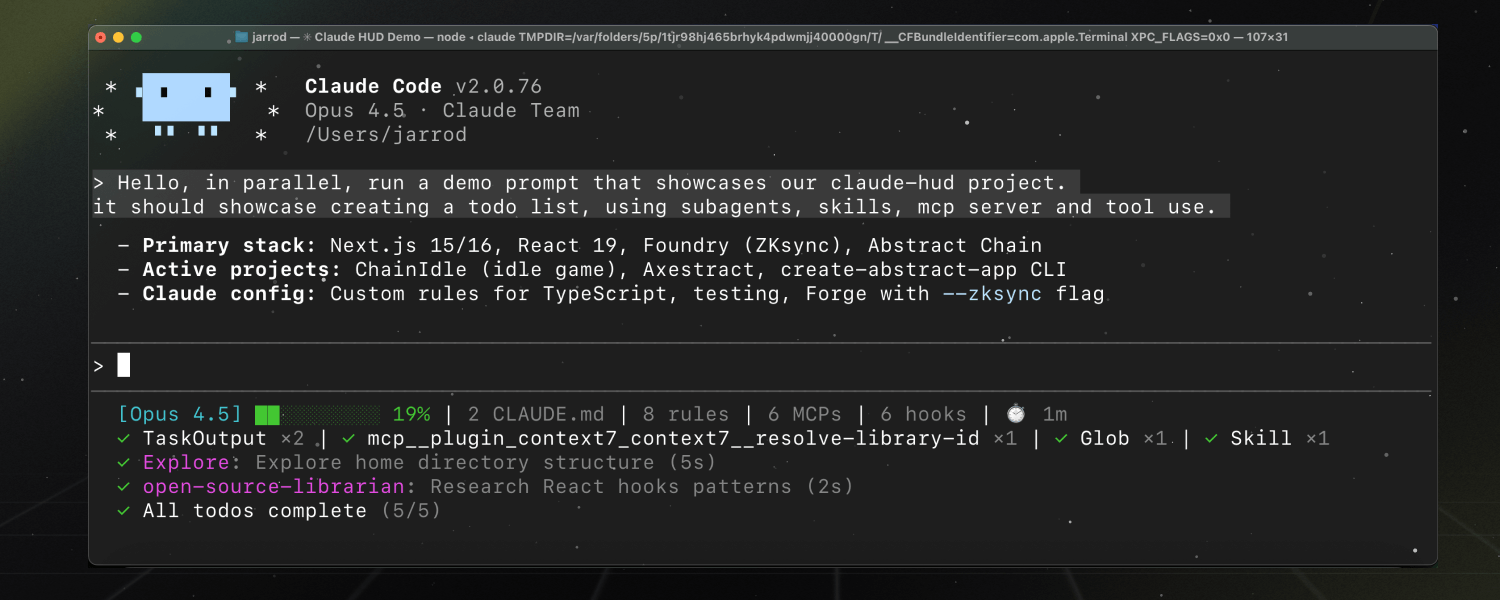
Claude HUD's core purpose is to provide one or more persistent real-time status bars inside the Claude Code terminal so you can see without leaving the current session:
- Context usage: Progress bar + percentage (or token count), color changes with usage (green→yellow→red), shows token breakdown at high usage
- Tool activity: Currently executing or just-completed tools (e.g., Edit, Read, Grep) and their counts
- Sub-agent status: Running Agents, the model used, task description, and elapsed time
- Todo progress: Current task list completion status (e.g., 2/5)
- Project and Git: Current path (1–3 levels), branch, uncommitted changes, ahead/behind, file statistics (configurable)
- Usage limits: Pro/Max/Team users' rate-limit usage bar and 7-day breakdown (optional)
All of this without interrupting input or opening additional windows, improving "observability" of the session.
Use Cases
-
Daily coding
- Check context at any time to decide whether to compress or start a new session
- See which file is currently being edited/read, whether tools are stuck
-
Debugging and observing
- See what sub-agents are doing and how long they've been running
- Check which Todo has been reached to align progress with Claude
-
Usage and quota management
- Pro/Max/Team users see daily/period usage and 7-day breakdown to avoid limit violations
-
Multi-project switching
- Confirm the current repo and branch via path and Git info to reduce mistakes
-
Terminal-first users
- Don't want tmux or extra windows, prefer everything in the current terminal
Quick Start
Requirements: Claude Code v1.0.80+, Node.js 18+ or Bun.
In a Claude Code session, run in order:
# Step 1: Add plugin marketplace (if not already added)
/plugin marketplace add jarrodwatts/claude-hud

# Step 2: Install the plugin
/plugin install claude-hud

# Step 3: Configure the status bar (first run guides through presets and options)
/claude-hud:setup
After completion, the HUD appears immediately below the input field — no restart required.
Linux users: If installation reports EXDEV: cross-device link not permitted (because /tmp is a separate filesystem), set TMPDIR before starting Claude Code and installing:
mkdir -p ~/.cache/tmp && TMPDIR=~/.cache/tmp claudeThen run Step 2 and Step 3 in that same session. See Claude Code related issue for details.
Subsequent adjustments: Run /claude-hud:configure at any time for guided configuration, or directly edit ~/.claude/plugins/claude-hud/config.json.
Core Features
-
Native token data
- Uses Claude Code's statusline API — shows real token information, not estimates
-
~300ms refresh
- Status bar updates approximately every 300ms for near-real-time feedback
-
No extra windows needed
- Doesn't depend on tmux or new terminals — displayed directly in the Claude Code terminal, below the input field
-
Context bar colors
- Green→yellow→red based on usage; at high usage (e.g., 85%+) can show token breakdown
-
Tool / Agent / Todo rows
- Optional display: tool activity row, Agent status row, Todo progress row (off by default — enable in configuration)
-
Three presets
- Full: Tools, Agents, Todos, Git, usage, duration, etc. all on
- Essential: Activity row + Git, moderate information
- Minimal: Model name and context bar only
-
Layout and path
lineLayout:expanded(multi-line) orcompact(single-line)pathLevels: 1–3 directory depth levels
-
Git information
- Branch, dirty marker (*), ahead/behind (↑N ↓N), file statistics (!M +A ✘D ?U) all toggleable
-
Usage display (Pro/Max/Team)
- Shows rate-limit usage bar and 7-day breakdown; configurable threshold (e.g., 80%) to only show 7-day view when approaching limit
-
Configuration methods
- Guided:
/claude-hud:configure; advanced users can directly editconfig.json
- Guided:
Project Advantages
| Comparison | Claude HUD | No plugin / logs only | Custom monitoring script |
|---|---|---|---|
| Visibility | Persistent below input, real-time | Requires screen switching or log browsing | Implementation-dependent |
| Data source | Native statusline + transcript | None or self-parsed | Requires custom integration |
| Configuration | Presets + fine-grain + config.json | None | Self-maintained |
| Installation | 3 commands, no Claude source modification | None | Requires environment integration |
| Usage display | Pro/Max/Team supported | None | Self-implemented |
Why choose Claude HUD?
- Designed specifically for Claude Code, deeply integrated with statusline/transcript — accurate data, fast refresh
- Zero extra windows — get a "dashboard" view within the terminal
- Presets + configurable — works out-of-the-box and can be trimmed or expanded as needed
- Open-source, well-documented — README and Issues available when problems arise
Detailed Project Analysis
Architecture and Data Flow
The data flow summary from the README:
Claude Code → stdin JSON → claude-hud → stdout → displayed in terminal
↘ transcript JSONL (tools, agents, todos)- stdin JSON: statusline-related data from Claude Code (including native tokens etc.) for rendering the first line, context/usage bars
- transcript JSONL: Session transcript; claude-hud parses tool calls, sub-agents, and Todos for tool rows, Agent rows, and Todo rows
- stdout: Rendered status bar text output to terminal, displayed by Claude Code below the input field
- Update frequency: ~300ms per update, balancing real-time feel while avoiding excessive screen refreshing
Project Structure (Overview)
.claude-plugin/: Claude Code plugin metadata and entry pointcommands/: Plugin commands (e.g.,setup,configure)src/: Core logic (parsing statusline, transcript, generating status bar content)dist/: Build artifactstests/: Tests
Configuration Options Overview
Configuration can be done via /claude-hud:configure or by directly editing ~/.claude/plugins/claude-hud/config.json. Main options from the README:
Layout and path
lineLayout:expanded|compactpathLevels: 1 | 2 | 3 (number of project path levels to display)
Git (gitStatus)
enabled: Whether to show GitshowDirty: Uncommitted changes marker (*)showAheadBehind: ↑N ↓NshowFileStats: !M +A ✘D ?U
Display (display)
showModel: Whether to show model name (e.g., [Opus])showContextBar: Whether to show context barcontextValue:percentortokensshowUsage: Whether to show usage (Pro/Max/Team)usageBarEnabled: Whether usage shows as a progress barsevenDayThreshold: Percentage at which to show 7-day usage (0 = always show)showTokenBreakdown: Whether to show token breakdown at high context usageshowTools/showAgents/showTodos: Whether to show tool/Agent/Todo rowsshowConfigCounts,showDuration,showSpeed, etc.: Enable as needed
Invalid JSON or illegal values cause silent fallback to defaults; delete config and re-run /claude-hud:configure to generate new configuration.
Usage and Subscriptions
- Usage display requires Claude Code OAuth login, only available to Pro / Max / Team subscribers (rate-limited billing). API users are billed per token and don't have this type of usage bar.
- When using AWS Bedrock, the interface shows "Bedrock"; usage is managed by AWS and HUD doesn't show a usage bar.
- If usage doesn't appear: confirm you're logged in with a Pro/Max/Team account (not API Key) and that
display.showUsageis not set tofalsein config.
Troubleshooting (README)
- Config not taking effect: Check JSON syntax,
pathLevelsandlineLayoutvalues; if needed, delete config and run/claude-hud:configureagain. - Git not showing: Confirm you're in a Git repository and
gitStatus.enabledis notfalse. - Tool/Agent/Todo rows not appearing: Enable
showTools,showAgents,showTodosin config; these rows only appear when there is corresponding activity.
Project Resources
Official Resources
- 🌟 GitHub: https://github.com/jarrodwatts/claude-hud
- 📚 README: Installation, configuration, options, examples, troubleshooting
- 🐛 Issues: GitHub Issues
- 📦 Claude Code Marketplace: jarrodwatts/claude-hud
Related Resources
- Claude Code: Requires v1.0.80+; Linux installation issues see anthropics/claude-code#14799
- Plugin development: See CONTRIBUTING, TESTING, RELEASING in repository
Who Should Use This
- Daily Claude Code users: Want to monitor context, tools, Agents, Todos, and usage without leaving the terminal
- Pro/Max/Team users: Need intuitive visibility into rate limits and 7-day usage
- Observability fans: Want to see "what's happening in the current session" clearly
- Terminal-first users: Don't want tmux or extra windows, prefer everything in one session
Welcome to visit my personal homepage for more useful knowledge and interesting products