Introduction
"Make the Uneditable, Editable."
This is Part 32 of the "Open Source Project of the Day" series. Today we explore Edit-Banana (GitHub).
Flow charts, architecture diagrams, and technical schematics in papers, reports, and textbooks are often "dead images" in PNG/JPG or PDF — text can't be changed, shapes can't be dragged, and templates can't be swapped. Edit-Banana is an open-source universal content re-editor framework from Beijing Institute of Technology's Data Lab (BIT-DataLab): using a custom fine-tuned SAM 3 (Segment Anything Model 3) for diagram element segmentation, and multimodal LLMs (Qwen-VL / GPT-4V, etc.) for multi-round scanning and OCR, it converts static images/PDFs with high fidelity into DrawIO (XML), SVG, PPTX — every element can be individually selected, dragged, and restyled, achieving truly "editable" output.
Why it's worth checking out:
- 🍌 Image → DrawIO/PPTX: Flow charts, architecture diagrams, formula diagrams → editable XML/SVG/PPTX
- 🤖 SAM3 + Multimodal VLM: Segmentation + multi-round VLM scanning, preserving layout, hierarchy, and arrow styles
- 📐 High fidelity: Layout logic, colors, stroke/fill, dashed/solid lines, text and formulas (including LaTeX) preserved as closely as possible
- 🌐 Ready-to-use Demo: Online at editbanana.anxin6.cn — upload and use immediately; locally supports Web (React + FastAPI) and CLI
- 📄 PDF → PPTX: Converts PDFs into editable slides
- 🔧 Configurable: SAM3 thresholds, paths, dominant colors adjustable via
config.yaml
What You'll Learn
- Edit-Banana's positioning and typical use cases (image→DrawIO, PDF→PPTX, human-in-the-loop editing)
- The overall pipeline: input → SAM3 segmentation → text/formula OCR (Azure + VLM fallback) → merge → XML/PPTX
- Key technical points: SAM3 fine-tuning, multi-round VLM scanning, Azure OCR, crop-guided high-res text/formula recognition, LaTeX output
- Project structure, installation and configuration, Web and CLI usage modes
- Comparison with similar "image-to-editable" solutions and selection guidance
- Development roadmap (smart arrow connections, template adaptation, batch export, local VLM)
Prerequisites
- Basic concepts of image segmentation and OCR
- Familiarity with DrawIO (.drawio / XML) or PPTX format is helpful
- Local deployment requires Python 3.10+, optional CUDA GPU; frontend requires React + Node
Project Background
Project Introduction
Edit-Banana's slogan is "Universal Content Re-Editor: Make the Uneditable, Editable". It addresses the problem of charts, diagrams, and formulas in static formats (images, PDFs) not being directly editable.
Through a pipeline of "SAM 3 segmentation + multimodal LLM multi-round scanning + high-quality OCR (Azure + VLM fallback + formula LaTeX)", it converts:
- Input: PNG/JPG images, or PDF
- Output: Editable DrawIO (XML), SVG, PPTX where elements can be individually selected, dragged, and restyled
This preserves the original image's layout logic, colors, hierarchy, and arrow styles, and supports further editing in DrawIO or PowerPoint, including template changes.
Target users:
- Researchers and writers who need to make figures from papers/reports editable
- Teachers and course creators who want to unify existing textbook/lecture diagrams into DrawIO/PPT
- Developers and product managers who want to quickly get editable diagrams from design mockups or screenshots
- Learners interested in SAM, multimodal VLM, and OCR pipelines
Author/Team Introduction
- Team: BIT-DataLab (Beijing Institute of Technology Data Lab)
- Key contributors: Chai Chengliang, Zhang Chi, Deng Qiyan, Rao Sijing, and others (see GitHub Contributors)
- Contact: WeChat group QR code in README for community discussion; Issues for bugs and suggestions
Project Stats
- ⭐ GitHub Stars: ~1.9k (GitHub)
- 🍴 Forks: ~99
- 📦 Repository status: 22 commits, continuously iterating; README notes online service is updated first, GitHub code may lag behind online capabilities
- 📄 License: Apache-2.0 (commercial use, secondary development allowed, with copyright attribution)
- 🌐 Online Demo: editbanana.anxin6.cn
- 💬 Community: GitHub Issues, WeChat group (see README)
Tech stack: Python (100% of repository language), CUDA, React (frontend), FastAPI (backend).
Main Features
Core Purpose
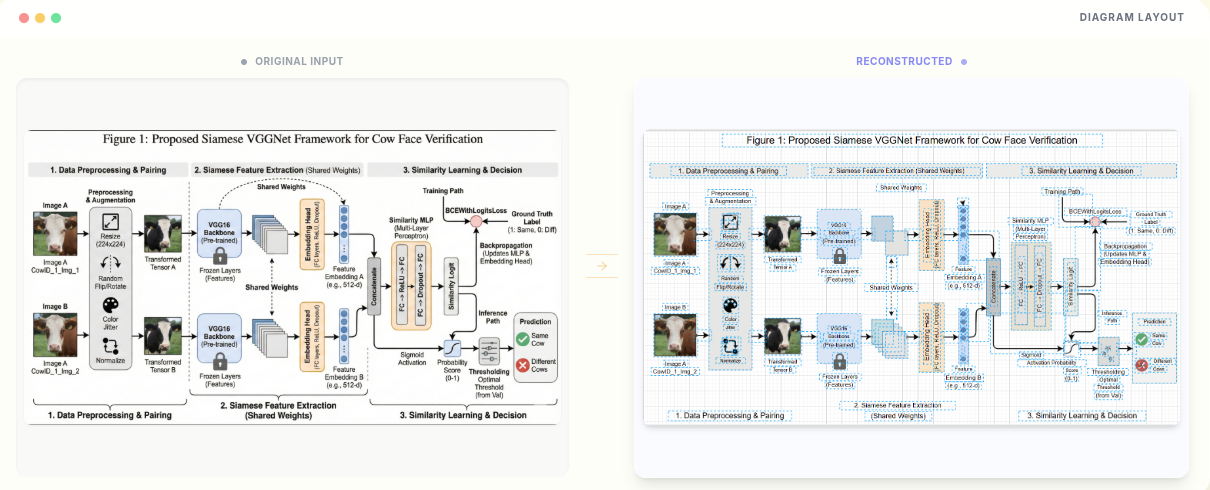
Edit-Banana's core purpose is to convert "non-editable" static charts/PDFs into "editable" DrawIO (XML), SVG, PPTX.
- Image → DrawIO / SVG / PPTX: Flow charts, architecture diagrams, technical schematics, formula diagrams — output draggable, restyable elements
- PDF → PPTX: PDF pages converted to editable PPT slides
- Human-in-the-loop: Supports manual intervention during the conversion process
During conversion, the goal is to:
- Preserve layout logic, colors, element hierarchy
- 1:1 restore shape stroke/fill, arrow styles (dashed, thickness, etc.)
- Accurately recognize text and formulas, supporting subsequent editing and LaTeX formulas
Use Cases
-
Making paper/report figures editable
- Convert flow charts and architecture diagrams from PNG to DrawIO for easy revision and reuse
-
Unifying textbook/lecture chart formats
- Convert scanned or screenshot images in batches to DrawIO or PPTX for consistent style and template
-
Quick diagrams from design mockups/screenshots
- Design images or interface screenshots → editable diagrams for further design in DrawIO/PPT
-
PDF lecture notes to PPT
- Convert PDF lecture notes to editable PPTX for easy layout and content modification
-
Technical documentation and training materials
- Convert static technical schematics and system architecture diagrams into maintainable DrawIO/PPTX
Quick Start
Online Use (Recommended)
- Open https://editbanana.anxin6.cn/
- Upload an image or PDF to get editable DrawIO (XML) or PPTX
- New users get some free credits upon registration
Local Installation and Running
Environment: Python 3.10+, Node.js & npm (frontend), GPU with CUDA recommended.
# 1. Clone
git clone https://github.com/BIT-DataLab/Edit-Banana.git
cd Edit-Banana

# 2. Create directories
mkdir -p input output sam3_output

# 3. Download model (e.g., SAM3)
# Download from https://modelscope.cn/models/facebook/sam3, place at models/sam3.pt, configure path in config

# 4. Backend dependencies
pip install -r requirements.txt

# 5. Config file and environment variables
cp config/config.yaml.example config/config.yaml
# Create .env, configure AZURE_ENDPOINT, AZURE_API_KEY, etc. (see README)

# 6. Frontend
cd frontend && npm install && cd ..
Web mode:
# Backend
python server_pa.py   # Default http://localhost:8000

# Frontend (separate terminal)
cd frontend && npm run dev   # Default http://localhost:5173
Access the frontend in browser; upload images to see conversion results (with embedded DrawIO editor).
CLI mode:
# Single image
python main.py -i input/test_diagram.png
# Output XML etc. in output/ directory
Core Features
-
SAM3 Segmentation
- Uses the project's fine-tuned SAM 3 for diagram element segmentation, laying the groundwork for geometry and hierarchy restoration
-
Multi-round VLM Scanning
- Fixed multi-round scanning guided by multimodal LLMs (e.g., Qwen-VL, GPT-4V) to extract structure, relationships, and text
-
High-quality OCR and Formulas
- Azure Document Intelligence for precise text localization
- Automatic fallback to VLM end-to-end OCR if Azure is unavailable
- Mistral Vision / MLLM for text correction and formula-to-LaTeX conversion
- Crop-Guided: High-resolution cropping of text/formula areas for better recognition quality
-
Users and Concurrency
- User system: Free credits on registration, usage-based billing to prevent abuse
- Multi-user concurrency: Global Lock ensures GPU thread safety, LRU Cache caches image embeddings for performance and stability
-
Web and CLI
- React frontend + FastAPI backend, upload and use immediately; also provides CLI (
main.py) for scripting
- React frontend + FastAPI backend, upload and use immediately; also provides CLI (
-
Configurable
config/config.yamlallows tuning: SAM3 score threshold, NMS, iterations, paths, dominant color extraction, etc.
Project Advantages
| Comparison | Edit-Banana | Traditional Screenshot Redraw | Generic OCR Tools |
|---|---|---|---|
| Output format | DrawIO(XML)/SVG/PPTX editable | Mostly bitmaps | Plain text/tables |
| Chart structure | Preserves shapes, connections, hierarchy | Requires manual redraw | No layout preservation |
| Formulas | LaTeX output, editable | Difficult to reuse | Partial support |
| Tech stack | SAM3 + Multimodal VLM + OCR | Manual/simple tools | Primarily text-focused |
| Open source & commercial | Apache-2.0, secondary development allowed | Depends on tool | Depends on product |
Why choose Edit-Banana?
- Specifically designed for "image → editable" scenarios, output directly usable in DrawIO/PPT
- Segmentation + VLM + OCR combination with specialized design for layout, arrows, and formulas
- Has online Demo and complete local deployment solution for easy testing and integration
- Open-sourced by BIT Lab, Apache-2.0 friendly
Detailed Project Analysis
Architecture and Pipeline
The overall pipeline is a sequential + parallel flow:
- Input: Image (PNG/JPG) or PDF
- Segmentation (SAM3): Use fine-tuned SAM3's mask decoder to get diagram element regions
- Text extraction (parallel):
- Azure OCR for text boxes
- High-resolution crop of text/formula areas, sent to Mistral/LLM for recognition and LaTeX conversion
- Generation: Merge SAM3 spatial information with OCR text, generate XML (DrawIO) / PPTX
Input (Image/PDF)
    → SAM3 Segmentation
    → Text Extraction (Azure OCR + VLM crop-guided + LaTeX)
    → Merge spatial + text
    → DrawIO (XML) / SVG / PPTX
Project Structure (Overview)
Based on the README, the structure is approximately:
Edit-Banana/
├── config/              # Configuration (e.g., config.yaml)
├── flowchart_text/      # OCR and text extraction (Azure, Mistral, alignment, etc.)
├── modules/             # General modules
├── prompts/             # Multimodal/LLM prompts
├── sam3/                # SAM3 model wrapper
├── sam3_service/        # SAM3 service
├── scripts/             # Utility scripts (e.g., merge_xml.py for merging and orchestration)
├── static/              # Static resources and demo images
├── main.py              # CLI entry (modular pipeline)
├── server_pa.py         # FastAPI backend (Web service)
└── requirements.txt
Frontend is in frontend/ (React), uploading files and receiving generated XML/PPTX via backend API.
Key Technical Points
- SAM3 fine-tuning: Fine-tuned for diagram scenarios to improve segmentation quality for shapes, arrows, and block diagrams
- Multi-round VLM: Uses multimodal LLMs for multiple rounds of "scanning" to extract structure, relationships, and text — rather than single-pass recognition
- Crop-Guided OCR: Only crops text/formula regions at high resolution for LLM input, balancing accuracy while controlling tokens and cost
- Concurrency and caching: Global Lock + LRU Cache allows multiple users to safely share GPU while reducing repeated computation
Configuration Guide (config.yaml)
The README mentions adjustable settings in config/config.yaml:
- sam3: score threshold, NMS threshold, maximum iteration rounds, etc.
- paths: input/output directories
- dominant_color: dominant color extraction sensitivity
Environment variables (in .env) require AZURE_ENDPOINT, AZURE_API_KEY, etc. — see repository documentation for specifics.
Development Roadmap (README)
| Module/Feature | Status | Description |
|---|---|---|
| Core conversion pipeline | ✅ Complete | Full segmentation + reconstruction + OCR pipeline |
| Smart arrow connections | ⚠️ In progress | Automatically associate arrows with target shapes |
| DrawIO template adaptation | 📍 Planned | Support custom template imports |
| Batch export optimization | 📍 Planned | Batch export as .drawio, etc. |
| Local VLM adaptation | 📍 Planned | Support local VLM without cloud API dependency |
Project Resources
Official Resources
- 🌟 GitHub: https://github.com/BIT-DataLab/Edit-Banana
- 🌐 Online Demo: https://editbanana.anxin6.cn/
- 📚 Documentation: Primarily GitHub README with installation, configuration, and usage instructions
- 💬 Community: GitHub Issues, WeChat group QR code in README
- 🐛 Issue Tracker: GitHub Issues
Related Resources
- SAM / SAM3: Segment Anything Model series (e.g., ModelScope sam3)
- DrawIO: draw.io editor and XML format documentation
- Azure Document Intelligence: OCR service documentation
Who Should Use This
- Researchers, teachers, and writers who need to convert paper figures, report images, and textbook diagrams to editable DrawIO/PPTX
- Developers who want to learn how to combine SAM + multimodal VLM + OCR in practice
- Products and projects needing image-to-editable capabilities (can build on Apache-2.0)
- Learners interested in chart understanding, formula recognition, and document structuring
Welcome to visit my personal homepage for more useful knowledge and interesting products